Proposals & Quotes
Professional Proposal Design: 9 Tips That Win Clients
Julius
|December 30, 2025|11 min read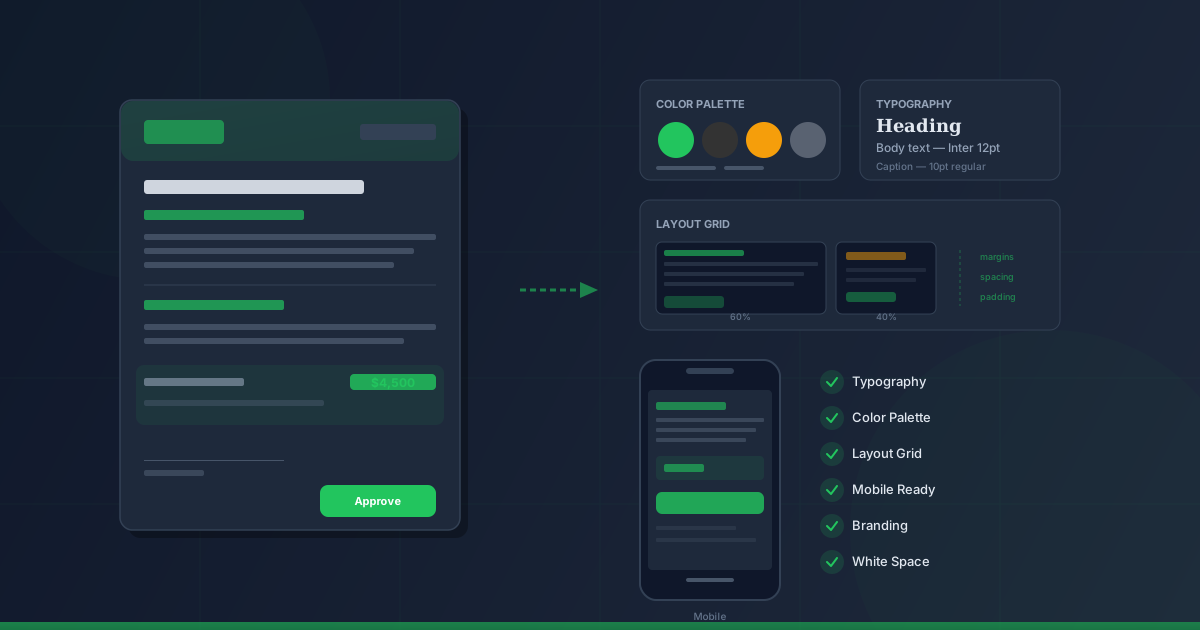
Why Proposal Design Decides Between Winning and Losing
You had the perfect conversation, the client is excited — and then you send a proposal that looks like a tax form. Gray walls of text, no structure, no branding. What happens? The client loses the trust you built in the conversation.
Professional proposal design is not a nice-to-have — it is a decisive competitive advantage. Your proposal is often the last document a client sees before making their decision. And in most cases, they are comparing it with two or three competing proposals.
The good news: you do not need a graphic design degree. With the right fundamentals, you can transform any proposal into a compelling sales document. In this article, I will show you the most important design principles — from typography to color choices to mobile optimization.
Typography: The Foundation of Every Professional Proposal
Typography is the foundation of your proposal design. It determines whether your document looks professional or amateurish — and whether your client actually reads it.
Choosing the Right Font
Forget Comic Sans, Papyrus, and other disasters. For professional proposals, sans-serif fonts work best:
| Font | Character | Ideal For | |------|-----------|-----------| | Inter | Modern, neutral | Tech, startups, digital | | Source Sans Pro | Friendly, readable | Consulting, coaching | | Helvetica/Arial | Classic, universal | Corporate, B2B | | Lato | Warm, professional | Creative industry, marketing |
Golden rule: Use a maximum of two fonts — one for headings, one for body text. More than that looks chaotic.
Font Sizes and Hierarchy
A clear typographic hierarchy guides your client's eye through the document:
- Title (H1): 24-28pt — Your project name, used only once
- Section headings (H2): 18-20pt — Services, investment, timeline
- Sub-headings (H3): 14-16pt — Individual service packages
- Body text: 10-12pt — Descriptions and details
- Fine print: 8-9pt — Terms, footnotes (use sparingly)
Line Spacing and Readability
A common beginner mistake: line spacing is too tight. Your client needs room to breathe between lines.
- Body text: 1.4-1.6x line height
- Headings: 1.2x line height
- Paragraph spacing: 6-12pt after each paragraph
These sound like small details — but they are exactly what separates a professional proposal from a hastily thrown-together Word document.
Colors: Building Trust With the Right Palette
Colors trigger emotions. The right color choices in your proposal build trust, guide attention, and convey your brand identity.
Building Your Proposal Color Palette
You need exactly three colors:
- Primary color — Your brand color. For headings, accents, and the header. Maximum 20% of the surface area.
- Neutral color — Dark gray (#333) or charcoal for body text. Never use pure black (#000) — it is too harsh on the eyes.
- Accent color — For calls-to-action, important numbers, and buttons. Use sparingly: prices, totals, "Approve now" buttons.
Colors and Their Effect on Clients
| Color | Effect | Industries | |-------|--------|------------| | Blue | Trust, professionalism | Consulting, IT, finance | | Green | Growth, sustainability | Environment, health, startups | | Orange | Energy, creativity | Marketing, design, creative | | Dark red | Premium, exclusivity | Luxury, high-end services |
Before/After: Color Impact in Proposals
Before: Everything in black on white. No structure, no accents, no focal point. The client does not know where to look first.
After: Headings in your brand color, total price highlighted with accent color, subtle background tint for the summary. The eye is automatically drawn to the most important elements.
Important: Less is more. When everything is colorful, nothing stands out. Color is a tool for guiding attention — not for decoration.
Layout and White Space: Room to Breathe
Layout is the skeleton of your proposal. It determines how your client absorbs and processes information.
The Grid System
Professional designers always work with a grid system. For proposals, I recommend a simple two-column layout:
- Left column (60-70%): Main content — service descriptions, text, explanations
- Right column (30-40%): Supplements — prices, notes, graphics, testimonials
This layout works because the client can grasp the service and the price at a glance without having to scroll back and forth.
White Space — Your Best Friend
White space is not wasted space. It is an active design element that creates clarity and elegance.
Concrete rules:
- Page margins: At least 1 inch (2.5 cm) on all sides
- Between sections: 20-30pt spacing
- Between heading and text: 8-12pt spacing
- Table cells: At least 8pt inner padding
Think of it like a luxury boutique: few products, lots of space, every piece gets to shine. A cluttered proposal looks like a bargain store — even if the content is high-quality.
The Optimal Page Structure
Every professionally designed proposal follows a proven structure:
- Cover page — Project name, client data, your logo, date
- Executive summary — 3-5 sentences showing you understand the client
- Service overview — What does the client get?
- Detailed service description — With timeline and milestones
- Investment — Prices clearly structured, optional add-ons
- About you / References — Social proof, qualifications
- Next steps — Clear call-to-action
If you are unsure how to structure the required elements, our guide on proposal templates for freelancers will help.
Branding: Your Proposal as a Brand Experience
Your proposal should look just like your website, your business card, and your LinkedIn profile. Consistent branding creates recognition and trust.
The Branding Checklist
- Logo: Top left or centered on the cover page. At least 150 DPI.
- Colors: Use your brand colors consistently (see color palette above)
- Fonts: The same typefaces as on your website
- Tone of voice: Does the language match your brand? A tech startup writes differently than a law firm
- Visual language: If you use images, they should match your brand style
An Example
Imagine you are a web designer. Your portfolio shows minimalist, modern websites with plenty of white space. Then your proposal arrives: colorful tables, three different fonts, a clip art as your logo.
What does the client think? "If their own proposal already looks like this, what will my website look like?"
Your proposal is a work sample. It shows the client how you work — before you have even started the project.
Visual Language: Images That Convince, Not Distract
Images in proposals are a double-edged sword. Used correctly, they strengthen your argument. Used poorly, they distract and look unprofessional.
When Images Make Sense
- Portfolio examples: Show 2-3 relevant work samples (matching the client's project)
- Process visualizations: A timeline or flowchart of your project workflow
- Team photos: For larger projects — the team behind the proposal
- Charts: When presenting data or ROI projections
When to Skip Images
- Stock photos: Generic business images look interchangeable and lack credibility
- Overloaded infographics: If the client needs 5 minutes to understand a graphic, it does not belong
- Decorative images: An image that just "looks nice" but conveys no content is a waste of space
Rule of thumb: Every image in your proposal must answer a question or reinforce a statement. If it does not, leave it out.
Digital vs. PDF Proposals: Choosing the Right Format
The question "PDF or online?" is one of the most common decisions in proposal design. The answer: it depends on your client.
PDF Proposals
Advantages:
- Universally readable, no internet access needed
- Layout remains identical on all devices
- Appears more professional in traditional industries
- Easy to archive
Disadvantages:
- No tracking (you do not know if the client opened it)
- No interactive elements
- Changes require a completely new version
- Digital signatures are cumbersome
Interactive Online Proposals
Advantages:
- Tracking: You see when and how often the client opens the proposal
- Digital signatures: One click instead of print-sign-scan
- Interactive pricing: The client can select/deselect options
- Always up to date: Real-time changes possible
- Mobile-optimized: Automatic adaptation to every device
Disadvantages:
- Not all clients are digitally savvy
- Requires internet connection
- Dependency on the tool provider
The Best Solution: A Hybrid Approach
Offer both: an interactive online proposal as the primary format and a PDF version for download. This covers all client types.
If you want to compare different proposal software solutions, our comparison guide helps you find the best option for your business.
Mobile Optimization: Proposals on the Go
Over 60% of all emails are first opened on a smartphone. If your proposal is not readable on a phone, you are losing potential clients.
Mobile-First Design Rules
- Font size: At least 14px on mobile devices — anything smaller requires zooming
- Column layout: Switch to a single column on mobile
- Tables: Scrollable or stacked tables instead of horizontal overflow
- Buttons: At least 44x44px for touch targets
- Images: Responsively scaling, not fixed-size
The Mobile Test
Before sending a proposal, open it on your smartphone. Check:
- Is the text readable without zooming?
- Are tables displayed correctly?
- Does the digital signature work?
- Do all images load quickly?
If any of these questions is answered with "No," revise the proposal. A client who has to zoom and scroll on their phone will not sign — they will push it to "later." And "later" means never in 80% of cases.
Concrete Before/After Examples
Let us put theory into practice. Here are three typical mistakes and their solutions:
Example 1: The Wall of Text
Before: A three-page proposal in Times New Roman 12pt, single-spaced, no headings, no emphasis. Price buried on line 47.
After: Clear H2/H3 structure, services as bullet points, price in its own section with accent color. The client grasps the scope in 30 seconds.
Example 2: The Rainbow Proposal
Before: Five different colors, three fonts, a colorful logo banner on every page. Looks like an advertising flyer, not a business document.
After: Two colors (brand color + neutral), one font family in two weights (Regular + Bold), logo subtly in the header. Professional and focused.
Example 3: The Copy-Paste Proposal
Before: Generic template with "[Company name here]" placeholders that were partially never replaced. No reference to the client's project.
After: Personalized cover page with client name and project reference, individual summary of the briefing, relevant references from the same industry.
For the most common design mistakes and further pitfalls, check out our article on the 10 most common proposal writing mistakes.
The Design Checklist for Your Next Proposal
Before sending your next proposal, go through this checklist:
Typography
- [ ] Maximum 2 fonts used
- [ ] Clear size hierarchy (H1 > H2 > H3 > body)
- [ ] Line spacing at least 1.4
- [ ] Body text at least 10pt
Colors
- [ ] Maximum 3 colors (primary + neutral + accent)
- [ ] Sufficient contrast (text readable on background)
- [ ] Accent color only for important elements
Layout
- [ ] Generous page margins (at least 1 inch)
- [ ] Enough white space between sections
- [ ] Logical section order
- [ ] Prices clearly structured and easy to find
Branding
- [ ] Logo on cover page
- [ ] Consistent colors and fonts
- [ ] Tone of voice matches brand
Mobile and Format
- [ ] Tested on smartphone
- [ ] PDF version available
- [ ] Digital signature possible
Proposal Design With AI: The Fast Track
You want to implement all these rules but lack the time? Modern tools take the design work off your hands.
With AI-powered proposal software, you can create a professionally designed proposal in minutes — with correct typography, your branding, and a layout that works on every device.
The advantage: you focus on the content, the AI handles the design. This way, you combine your expertise with a professional appearance without spending hours on formatting.
If you know your hourly rate as a freelancer, you can quickly calculate: two hours of proposal formatting per week at $100/hour is over $10,000 in opportunity cost per year. A tool that does this work in 5 minutes pays for itself from the very first proposal.
Conclusion: Design Sells — Before You Say a Word
Professional proposal design is not an art — it is a craft. With the right fundamentals for typography, colors, layout, and branding, you can transform any proposal into a compelling sales document.
Remember: Your proposal is your business card. It shows the client how you work before you even start working together. A professionally designed proposal says: "I take your project seriously. I pay attention to detail. I deliver quality."
Start with the basics — good typography, a clear color palette, enough white space — and build from there. Every new proposal will be better than the last.
Related articles: Proposal Templates for Freelancers · Value-Based Pricing in Proposals · Following Up on Proposals Without Being Pushy · Proposal Software Comparison
Share
About the author
J
Julius
Julius is the founder of Proposal Air. As a former freelancer himself, he knows firsthand how much time proposals eat up — and is building the tool he always wished existed.
Create professional proposals in minutes
With Proposal Air, create stunning proposals — faster, more professional, and AI-powered.
No credit card required
Related Articles
Proposals & Quotes16 min
Proposal Strategy for Freelancers: The Complete Guide (2026)Everything freelancers need to know about proposals — from initial inquiry to winning the deal. The comprehensive guide linking to all specialist topics.
Julius
2/28/2026

Proposals & Quotes6 min
10 Proposal Mistakes Costing You Clients (and How to Fix Them)Why aren't your proposals getting accepted? Probably because of one of these 10 mistakes. With concrete examples and immediately actionable fixes.
Julius
12/27/2025

Proposals & Quotes6 min
Value-Based Pricing for Freelancers: How to Price Your Proposals by ResultsEscape the hourly rate trap: How value-based pricing helps you earn more and attract better clients. With formulas, examples, and proposal templates.
Julius
12/19/2025